
Authentication
Learn how to generate API keys, authenticate requests, and manage your API credentials securely.
All ReelPlus API v1 endpoints require authentication using a Bearer token (API key).
Generating an API Key
Open API Settings
Navigate to Settings > API Access in your ReelPlus dashboard.
Create a New Key
Click Generate API Key, enter a label (e.g., "Production Dashboard"), and click Generate API Key.
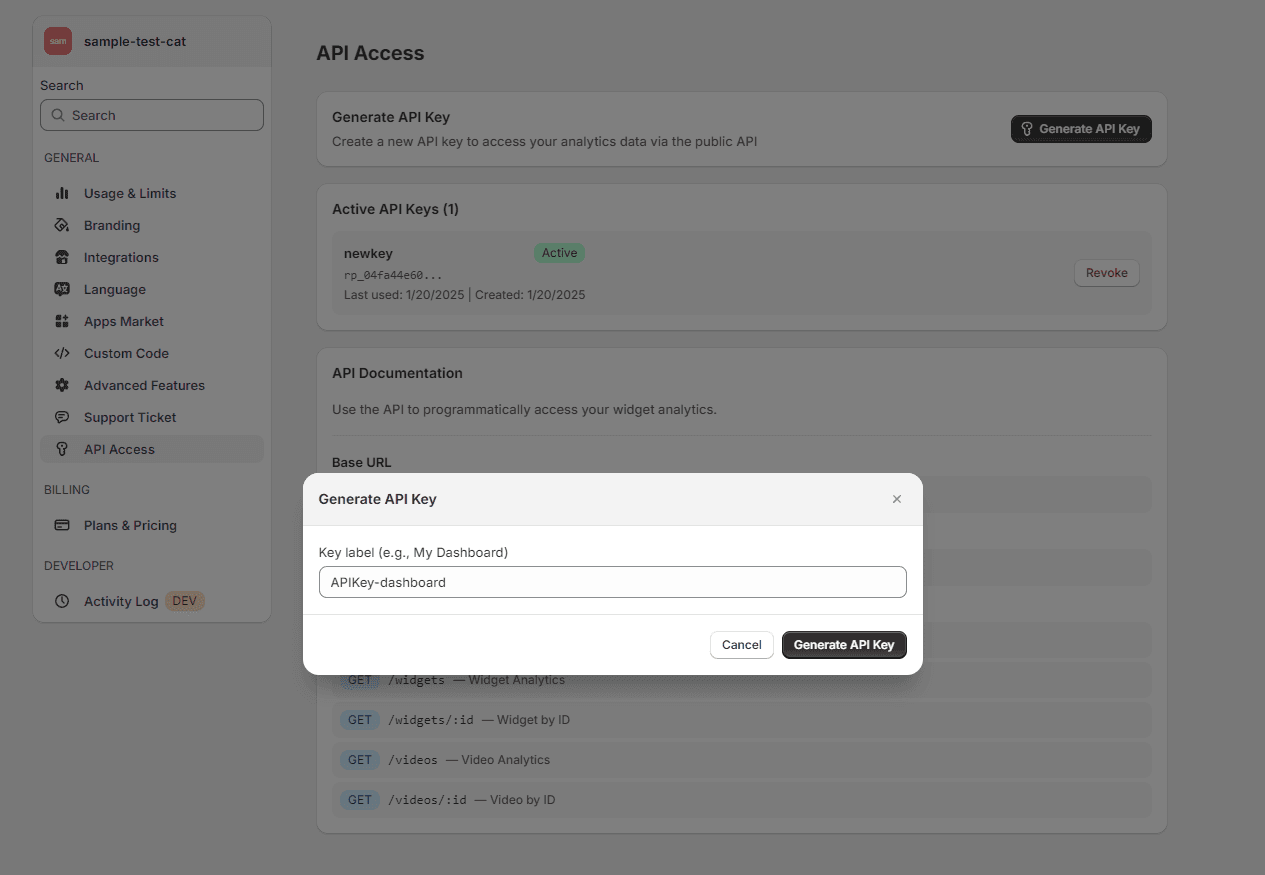
Copy Your Key
Your full API key is displayed only once. Copy it immediately and store it securely.
Key format:
rp_<64 hex characters>Example: rp_04fa44e60791f792fd44c279b0daa384b3fb3eb81709568d965ebe285c211acb
- Prefix:
rp_(always present) - Body: 64 hexadecimal characters (SHA-256 length)
Store your key securely. After creation, only the prefix is visible in the dashboard. The full key cannot be retrieved again. If you lose it, revoke and generate a new one.
Using Your API Key
Include the key in the Authorization header using the Bearer scheme:
curl -X GET "https://production.reelplus.app/api/v1/analytics/summary" \
  -H "Authorization: Bearer rp_your_api_key_here"
const API_KEY = "rp_your_api_key_here";
const response = await fetch(
"https://production.reelplus.app/api/v1/analytics/summary",
{ headers: { "Authorization": `Bearer ${API_KEY}` } }
);
const data = await response.json();import requests
API_KEY = "rp_your_api_key_here"
response = requests.get(
"https://production.reelplus.app/api/v1/analytics/summary",
headers={"Authorization": f"Bearer {API_KEY}"}
)
data = response.json()Key Security
- Keys are hashed with SHA-256 before storage — even a database breach won't expose your keys.
- Only the prefix (first 10 chars) is stored in plain text for identification.
- Last used timestamp is tracked on every successful request.
Managing Keys
| Action | Description |
|---|---|
| View | See prefix, label, status, last used, and created date |
| Revoke | Deactivate a key — requests immediately return 401 |
| Delete | Permanently remove a key from the system |
Security Best Practices
- Never expose keys in client-side code — call from your server only.
- Use environment variables instead of hardcoding.
- Rotate keys periodically.
- Use labels to track which key is used where.
Never commit API keys to version control. If accidentally exposed, revoke immediately and generate a new one.
Authentication Errors
| Status | Code | Description |
|---|---|---|
401 | UNAUTHORIZED | Missing or invalid Authorization header |
403 | INVALID_API_KEY | API key does not exist or has been revoked |
403 | PLAN_LIMIT | Your plan does not include API access |
API Overview
Access your ReelPlus analytics data programmatically with the ReelPlus REST API. Build custom dashboards, automate reports, and integrate video commerce data into your workflows.
Analytics Summary
Retrieve aggregated analytics metrics for your entire store including impressions, views, clicks, add-to-cart events, orders, and revenue.